Compatibility
Minecraft: Java Edition
Platforms


Creators

Details
Licensed Apache-2.0
Published 2 years ago
Updated 2 days ago
Status4Discord
Status4Discord is a dynamic Discord bot for Minecraft servers that provides real-time server stats through embeds and activities. It effortlessly connects your Minecraft server to Discord, keeping your community in the loop and engaged with information ranging from TPS to player counts.
Getting started
https://github.com/LasaJoniHD/Status4DiscordMC/wiki/Setup
Commands
Minecraft
/status4discord reload reload the config
/status4discord invite invite the discord bot
/status4discord info info about this plugin
/status4discord help all commands
Discord
@YourDiscordBot setembed set the embed textchannel
@YourDiscordBot setlogs set the logs textchannel
Permissions
Minecraft
status4mc.adminUse /status4discord reload and /status4discord invite
Discord
- Permission.ADMINISTRATOR
Config
Show config
#   _____ _        _             _  _   _____  _                       _
#  / ____| |      | |           | || | |  __ \(_)                     | |
# | (___ | |_ __ _| |_ _   _ ___| || |_| |  | |_ ___  ___ ___  _ __ __| |
#  \___ \| __/ _` | __| | | / __|__   _| |  | | / __|/ __/ _ \| '__/ _` |
#  ____) | || (_| | |_| |_| \__ \  | | | |__| | \__ \ (_| (_) | | | (_| |
# |_____/ \__\__,_|\__|\__,_|___/  |_| |_____/|_|___/\___\___/|_|  \__,_|
#
# Thank you for using Status4Discord by Joni
# To setup Status4Discord, please visit https://github.com/LasaJoniHD/Status4DiscordMC/wiki/Setup

#   _____ ___  _  _____ _  _
# |_   _/ _ \| |/ / __| \| |
#   | || (_) | ' <| _|| .` |
#   |_| \___/|_|\_\___|_|\_|
#
# Please paste your discord bot token here
token: ""

#    _   ___ _____ _____   _____ _______   __
#   /_\ / __|_   _|_ _\ \ / /_ _|_   _\ \ / /
#  / _ \ (__  | |  | | \ V / | |  | |  \ V /
# /_/ \_\___| |_| |___| \_/ |___| |_|   |_|
#
# Available Activities:
# PLAYING, WATCHING, LISTENING, CUSTOM_STATUS, COMPETING
# Available Status:
# ONLINE, IDLE, DO_NOT_DISTURB, INVISIBLE, OFFLINE
# You can use PlaceholderAPI if installed (only placeholders that do not require a player).
# Find placeholders included in Status4Discord at https://github.com/LasaJoniHD/Status4DiscordMC/wiki/Placeholders.
activity: "PLAYING %online_players% / %max_players% Players"
status-activity: "ONLINE"
update-activity: 30 # in seconds

# Activities for server start
server-starting-activity: "CUSTOM_STATUS Server is starting..."
server-starting-status: "IDLE"

# ServerIP
# will replace internal Placeholder %serverip%
# --------------------------------------------------------------------------------------------------------------------
# 'serverIP' sets the server IP shown in activity and in the embed.
# If in server.properties, it will obtain the IP that the server is bound to; if not set, it will display "not set."
serverIP: "server.properties"

#  _    ___   ___ ___
# | |  / _ \ / __/ __|
# | |_| (_) | (_ \__ \
# |____\___/ \___|___/
#
# If enabled, the bot will send a message when the server starts/stops in the specified logs channel.
# If you don't know how to obtain the textChannelID and have admin privileges,
# simply send a message in Discord in the channel like this: @MentionYourDiscordBot setlogs.
logs:
  enabled: true
  textChannelID: ""
  start:
    color: "GREEN"
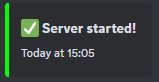
    message: ":white_check_mark: **Server started!**"
  stop:
    color: "RED"
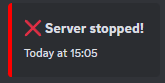
    message: ":x: **Server stopped!**"

#  ___ __  __ ___ ___ ___
# | __|  \/  | _ ) __|   \
# | _|| |\/| | _ \ _|| |) |
# |___|_|  |_|___/___|___/
#
# If enabled, the bot will send a status embed in the specified channel; this embed will be updated every few seconds.
# If you don't know how to obtain the textChannelID and have admin privileges,
# simply send a message in Discord in the channel like this:
# @MentionYourDiscordBot setembed.
embed:
  enabled: true
  textChannelID: ""
  update: 15 # in seconds

  online:
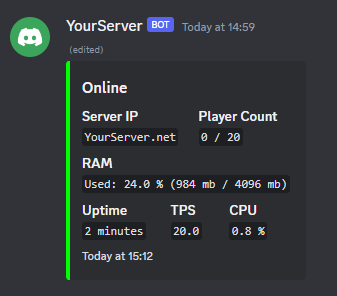
    title: "Online"
    color: "GREEN" # supports any java.awt.Color enum name (e.g. `RED`, `BLUE`, etc.) or a hex code (e.g. `#FF0000` for red)

    timestamp: true

    footer:
      text: "Uptime: %uptime%"

    fields:
      - name: "Server IP"
        value: "%serverip%"
        inline: true

      - name: "Player Count"
        value: "%online_players% / %max_players%"
        inline: true

      - name: "RAM"
        value: "Used: %usedram_percentage% % (%usedram% mb / %maxram% mb)"
        inline: false

      - name: "Uptime"
        value: "%uptime%"
        inline: true

      - name: "TPS"
        value: "%tps%"
        inline: true

      - name: "CPU"
        value: "%cpu% %"
        inline: true

  offline:
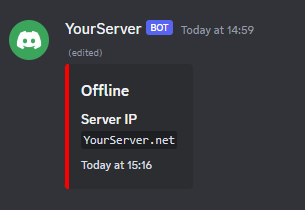
    title: "Offline"
    color: "RED"

    fields:
      - name: "Server IP"
        value: "%serverip%"
        inline: true

# Do not touch if you don't know what this setting does
embedMessageID: ""
debug: false
config-version: 4
Examples
Activity

Status Embeds
When server is online
When server is offline
Start/Stop Log Messages
Server Start
Server Stop